The SEO Transition Guide
Declassified — one of our internal process documents. For years this was a confidential document we only handed to clients mid-project, during a site redesign or migration. It was never public. Here it is: the discipline for moving a website without losing the search rankings it already earned.
A stylized mock — the real cover page is below, unedited.
How the SEO Transition Guide works
A site relaunch is where SEO goes to die — not because the new site is worse, but because nobody mapped what the old one was doing right. This document breaks the move into four disciplines. All four were written years before AI search existed, back when this page was still marked confidential, and all four are still exactly correct.
- 1 · Map Every Page First — before you touch anything, know every URL, title, and heading the current site has.
- 2 · Hold the Keyword Placement Priority — titles, meta descriptions, headings, content, links, alt tags, URLs, in that order, changed one page at a time.
- 3 · 301 Everything — every eliminated or changed page gets mapped to its closest live equivalent. Never the home page.
- 4 · Test, Submit, Monitor — after launch, verify every redirect, submit the new sitemap, and watch for weeks.
From the internal guide“Swapping out the underlying framework has its own inherent risks, interchanging content at the same time adds to that risk. In most cases the risk is offset by an improvement in optimization — as long as the changes don't cause Google to lose trust.” That sentence was written for internal use only. It's some of the plainest, most honest SEO risk management we've ever put on paper.
How to map, hold, redirect, and monitor a transition
The same four rules, in plain English — what each one is, and what it looks like done right.
1 · Map Every Page First
Before a single page changes, build a full SEO sitemap of the site you have: every URL, its meta title, meta description, and heading tags. Plan the new site the same way. In practice: a page-by-page list of the current site sitting next to its planned replacement, finished before development starts, not during.
2 · Hold the Keyword Placement Priority
Search engines learn what a page is about mostly from seven places, in order: page titles, meta descriptions, heading tags, content, links, image alt tags, and URLs. During a transition, keep each one doing the same job it did before — change the framework, not the message. In practice: the same core keywords in the same priority spots, refined one page at a time after launch, not all at once mid-move.
3 · 301 Everything
Any page that's changing URLs or being eliminated needs a 301 redirect to the most similar, topically relevant page that replaces it — otherwise it becomes a dead link, which is the fastest way for a search engine to lose trust in a site. Never redirect the home page. In practice: a redirect list built straight from the old sitemap, tested before launch, live the moment the new site is.
4 · Test, Submit, Monitor
Launch isn't the finish line. Test that every redirect actually works, submit the new sitemap through Google Search Console and Bing Webmaster Tools, and watch the 404 log for weeks afterward, adding redirects the moment a gap shows up. In practice: a standing weekly check on crawl errors and rankings for the first month or two after go-live.
Redirect 301 /old-url http://www.newsite.com/fully-qualified-new-urlThe sample redirect syntax straight from the original document — still correct. The rule: the word redirect, then 301, then the old local URL (without the domain), then the new fully-qualified URL, with a single space between each element. Never redirect the home page.
Pre-launch checklist
- Page-by-page SEO sitemap
- List of pages with URLs & links
- Meta titles & descriptions
- List of new corresponding pages
- List of URLs being eliminated
- HTML & XML sitemap creation
- 404 error logging enabled
- Consider a “related pages” smart 404 page
Post-launch process
- Insert the 301 redirect list
- Test that old URLs redirect correctly
- Update ping/crawl-request tooling
- Monitor for 404s and add redirects as they occur
- Submit sitemap through Google & Bing Webmaster Tools
- Monitor search engine listing & ranking for issues
We used to keep this behind closed doors. Here it is.
For years, this page didn't exist publicly. The SEO Transition Guide was an internal NW eSource document — we handed it to clients mid-project, during a site redesign or migration, marked confidential because that's how we labeled our internal process paperwork at the time. It was never written for a blog. It also happens to be some of the clearest, most durable SEO advice we've ever put down on paper, so we're releasing it.
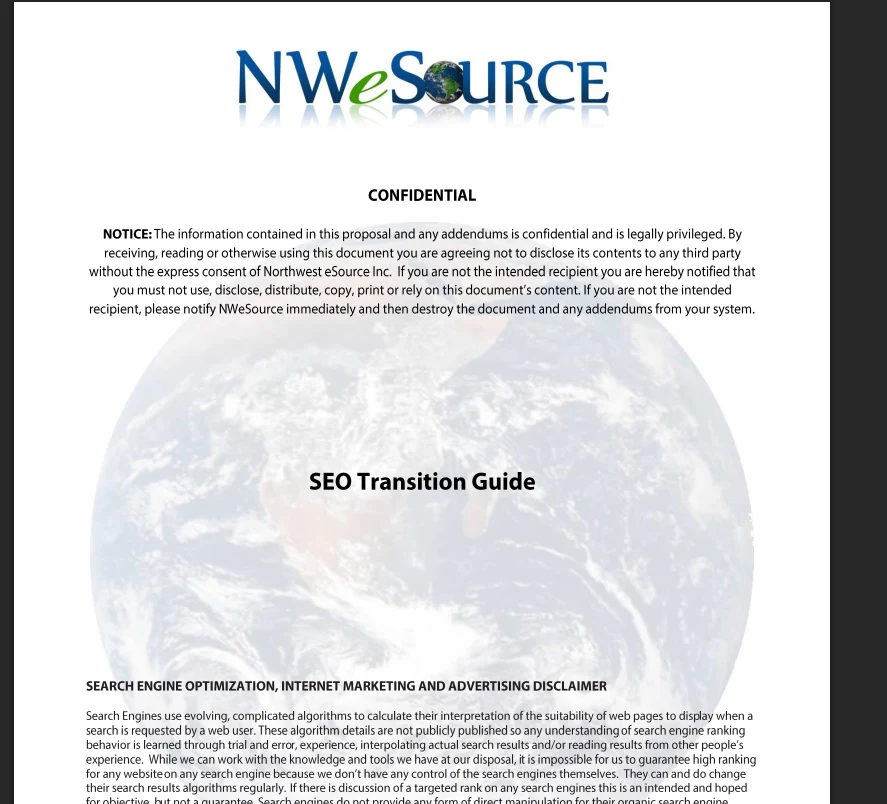
The cover page, verbatim“Search Engines use evolving, complicated algorithms… it is impossible for us to guarantee high ranking for any website on any search engine because we don't have any control of the search engines themselves. If there is discussion of a targeted rank on any search engines this is an intended and hoped for objective, but not a guarantee.” We were telling clients that, in writing, years before “no one can guarantee rankings” became a standard line across the industry.
The real cover page — click to enlarge. Unedited, notice and all.
Original cover page from one of our internal process documents, reproduced unedited — the confidentiality notice included. The four-part method above is what's inside it, brought current.
What’s changed since this was written — and what hasn’t
This document predates a lot: mobile-first indexing, Core Web Vitals, and AI search entirely. Here's an honest accounting of what held up and what didn't.
Still true
Map first. Hold the keyword placement priority. 301 everything. Never redirect the home page. Test after launch, not before. Every rule in the original document is still exactly right — confidential or not, it's some of the most durable SEO advice we've ever written.
What changed
The document tells you to ping search engines through RPC services to request a crawl — that's dead. WordPress disables XML-RPC pingbacks by default now, because the mechanism became a spam vector, not a courtesy. The specific plugins it names have mostly been renamed or replaced since (Yoast's still around and still fine). The tools change; the discipline doesn't need updating.
New for 2026
Two things this document couldn't have anticipated. First, schema: structured data barely mattered for SEO when this was written; today, preserving it through a migration matters as much as preserving your URLs. Second, and bigger: a “transition” today increasingly means leaving a bloated, aging platform for something faster and leaner entirely — not swapping a theme.
Who this is actually forWe audited 1,800 small-business sites and found 48% were stale or neglected — still running on the same platform, same theme, same problems, for years. That's the exact population this guide is for. For a lot of them, the honest answer isn't a theme change. It's a real transition.
We'll run your transition — or just tell you if you need one
Everything above is the method, yours to use for free. Two of our own tools are built directly on top of it, and this formula pairs with them more directly than any other in the series.
Should you transition at all?
The modern version of step one — map before you move. Our free health scan reads your current site's SEO, speed, and security in a couple minutes and tells you straight whether a transition is worth doing.
Run the free health scan →The transition itself, done for you
The productized version of everything on this page: we rebuild your site free, hold your rankings through the move using this exact discipline — sitemap, redirects, testing — then it's $299/mo going forward.
See the free rebuild + SEO offer →SEO transition questions, answered directly
What owners ask before and after a site relaunch — answered first-sentence, no mysticism.
What is the SEO Transition Guide?
It's an internal NW eSource process document for moving a website — a redesign, a replatform, a new domain — without losing the search rankings it already earned. We wrote it for our own project teams and shared it privately with clients mid-project; it was never public. We're publishing it now because the discipline in it is still exactly right, and it's most useful to the businesses who'd never have seen it otherwise.
Why was this document confidential in the first place?
It was working process paperwork handed to clients mid-project, not marketing material — it carries a standard confidentiality notice because that's how we labeled internal process documents at the time. There's nothing secret in the method itself. We just never got around to publishing it separately until now.
Do I need a 301 redirect for every page on my old site?
Every page that's being eliminated or whose URL is changing on the new site, yes. If a page's URL isn't changing, it doesn't need a redirect. The rule is simple: nothing that used to work should turn into a dead link.
Should I ever redirect my homepage URL?
No. Never redirect the home page itself. It's the one address search engines, backlinks, and everyone's bookmarks depend on staying exactly where it is.
What's the single biggest SEO mistake businesses make during a site relaunch?
Changing everything at once — content, URLs, and structure — with no map of what used to exist. Search engines lose trust fast when too much changes with no way to reconcile old pages to new ones. Map first, then move, and change one page at a time after launch.
Should I change my URLs to include better keywords during the move?
Not during the transition. Keep URLs stable through launch, then optimize them one page at a time afterward. Changing content and URLs at the same time doubles the risk right when you can least afford it.
How long should I monitor a site after launch?
Weeks, not days. 404 errors and ranking drops don't always show up immediately. Keep watching your error logs and Search Console data and add redirects the moment a gap shows up, for at least a month or two after go-live.
Does this still apply if I'm leaving WordPress entirely, not just changing themes?
More than ever. The bigger the platform change, the more URLs and structure are at risk, so the mapping and redirect discipline matters most exactly when you're doing a full replatform rather than a cosmetic refresh. It's also, increasingly, the more common case — aging, neglected sites are the ones that most need a real transition, not just a new theme.
One formula in a growing series — this one, we used to keep quiet.
The SEO Transition Guide joins NW eSource's Small Business Formulas for Success — named frameworks, kept current, free to use. Most of them started life as public 2011 marketing flyers. This one didn't; it started life stamped confidential. Two more formulas are in the works.
Where are you in the process?
Pick the situation that fits. Free assessment — no commitment, no pitch.
Free assessment. No commitment. No pitch.